Skip to content
Frictions

Checkout replay for WooCommerce

See where checkout
gets stuck.

Replay checkout errors and the steps around them, right inside WordPress. Find a clearer place to investigate.

  • Complete Free recorder
  • No Frictions account
  • Stored on your hosting
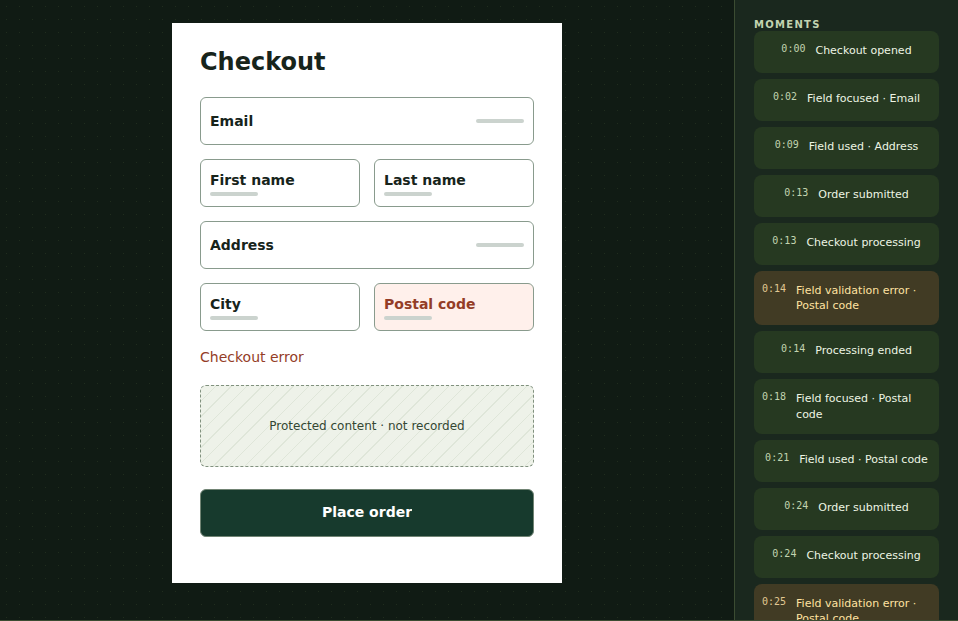
Inside a checkout replayFictional example
Actual Frictions 1.1.2 player showing a postcode error beside a simplified checkout. Entered values are excluded.
00:14

A postcode error appears.
What happens next?

Follow the three moments

Try it now · no signup

One checkout.
A clearer next step.

Explore the full demo

Choose a moment in this fictional checkout. You’re using the real Free player.

Fictional postcode error shown by the actual protected checkout player.
Follow the three moments above, or open the checkout image at full size.

Your next check

Is the expected postcode format clear?

Test the validation message and guidance on your store. The replay gives you something specific to investigate; it does not prove the cause or that a payment succeeded.

This is a simplified checkout, not a video of the store’s design. Entered values, original page text, images and payment frames are excluded. How capture works.

Take the next step with Pro

Found a question?
Keep it moving.

Save the work, decide what to check and give a developer the context—even if you run the store yourself.

01 · Keep track

Give the issue a next step.

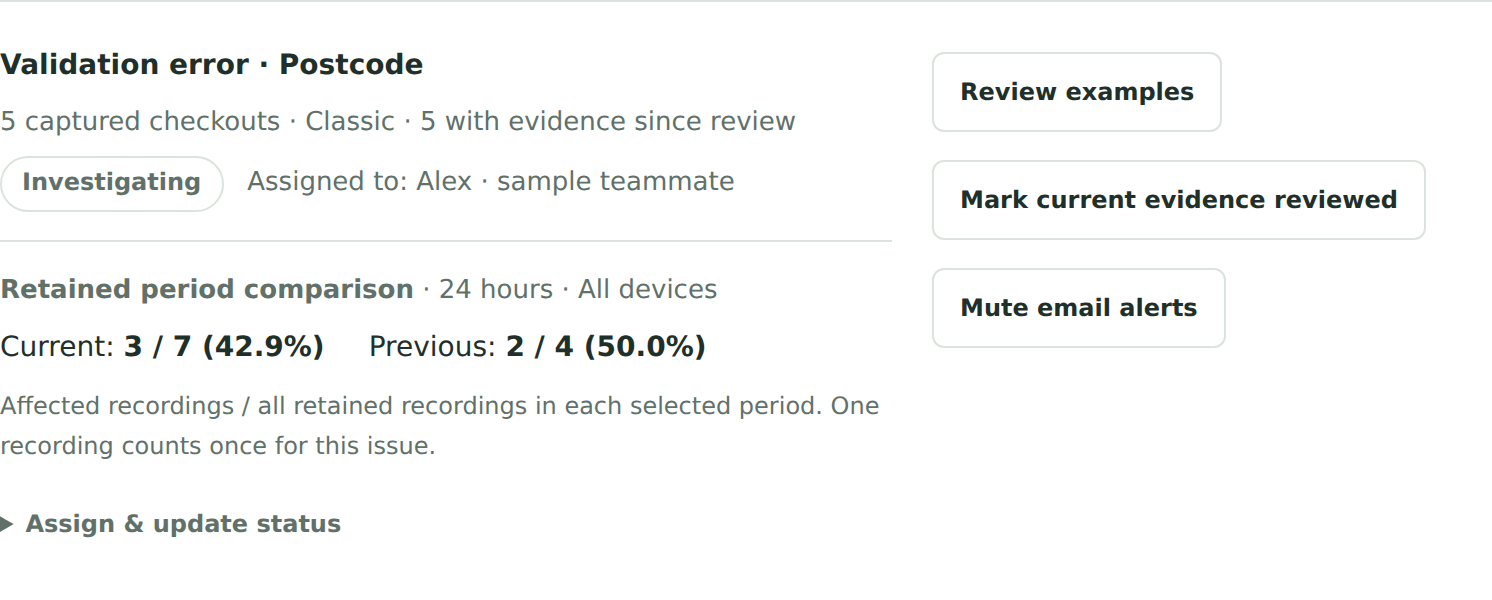
Keep the postcode issue in an investigation with an owner and review status. Return to your saved filters when it’s time to look for more evidence.

A clear place to come back to. A clear person responsible.

Try investigations in Pro
Actual Pro investigation for the fictional postcode issue, showing its owner and review status.
Frictions Pro 1.1.2 · fictional investigationOpen full-size screenshot

02 · Bring the context

Give your developer
a useful starting point.

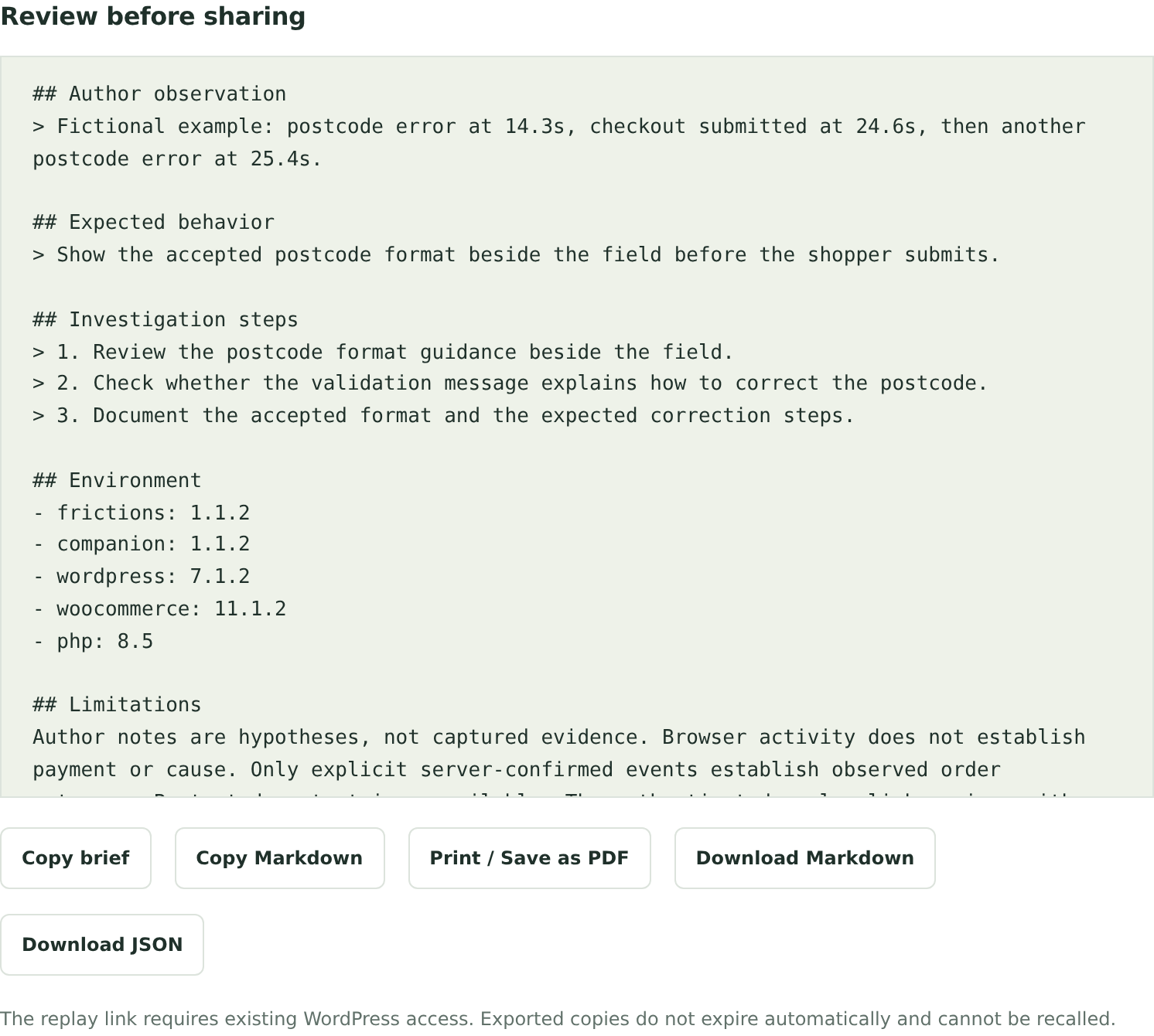
Bring the observed events, expected behaviour and investigation steps into one brief. Copy, download or print it when you’re ready to share.

Try developer briefs
Example brief · summaryFictional data

Postcode error after another attempt

Observed
A postcode error at 14.3s, another submission at 24.6s and another postcode error at 25.4s.
Expected
Explain the accepted postcode format beside the field so a shopper can check it before submitting.
Next check
Check the postcode guidance and validation message. Make the accepted format and correction steps clear.

Investigation guidance, not a confirmed diagnosis.

See the actual Pro brief
Actual completed Frictions Pro developer brief with the fictional postcode observations and investigation steps.
Actual Pro 1.1.2 · fictional exampleOpen full screenshot

Keep checking after a change.

Compare observed issues across two periods. Choose optional alerts or a weekly summary when you want a reminder to review.

Comparisons cover recordings still stored on your site. They do not establish a change’s effect on sales.

See every Pro tool

Choose your starting point

Start with Free.
Follow through with Pro.

Full feature comparison

Frictions Free

Understand a checkout.

  • Complete checkout recorder, player and timeline
  • Filters, issue observations and bookmarks
  • Consent, access, deletion and storage controls
Download Free

No trial deadline or paid recording allowance.

Frictions Pro add-on

Keep your investigation moving.

  • Saved filters, investigation queue and new evidence
  • Before/after observations and developer briefs
  • Team notes, optional alerts and weekly summaries
See annual plans

All Pro tools in every plan. Choose 1, 5 or 25 sites. Install alongside Free; activate your licence to unlock Pro.

Your store. Your recordings.

Keep checkout context.
Leave personal details out.

Recordings stay in your WordPress database. Capture begins only after your setup checks and the shopper’s analytics consent.

Understand the data flow

No entered field values

Entered values, original page text, images and payment frames are excluded by the recorder.

Focused on checkout

Frictions focuses on eligible checkout visits. It does not record product browsing or account pages.

You control storage and access

Choose retention and a storage budget. Limit access, pause capture or delete recordings in either edition. Bookmarks still expire.

Get ready to record

Three steps to your first replay.

Open the setup guide
  1. Check your store.PHP 8.4+, WordPress 7.0+ and WooCommerce 11.0+. Full requirements.
  2. Connect consent.Use a supported consent integration and configure storage. Follow the checklist.
  3. Verify a recording.Enable capture deliberately, then check an eligible visit. First-recording guide.

A few practical answers.

Does installing the plugin start recording?

No. Configure storage, verify a supported consent integration, then deliberately enable capture. Each shopper still needs to give affirmative analytics consent. Follow the consent checklist.

Which WooCommerce checkouts are supported?

Classic shortcode checkout and Checkout Blocks are supported. Your store also needs the supported software versions and transactional InnoDB database tables. Read the full requirements.

Does replay reproduce my store’s design?

No. The protected player reconstructs approved structure, safe labels and timing. It excludes entered values, original page text, images and payment frames. It is a simplified replay, not a pixel-perfect video of your theme.

Can Frictions prove why someone did not buy?

No. A replay shows observed structure, timing and events. Use it to form and test a hypothesis. It does not reveal a shopper’s thoughts or prove that a particular issue caused a lost sale.

How do updates and annual plans work?

Free downloads are public. Install Free, then Pro. New Pro installations need one valid licence activation to open Pro tools and register the site for eligible updates and support. Eligible Pro customers can also download matching packages through their purchase account. Pro plans renew annually until cancelled. After successful activation, local features keep working on that site while offline or when updates and support end. See pricing and terms.

Start with the evidence

Get the complete Free player.

Follow the setup guide, verify consent and review your first eligible checkout.

Get Frictions Free